Slicer Discord
Mergecube – 3D printable model from MakerWorld MakerWorld
Other Toys & Games

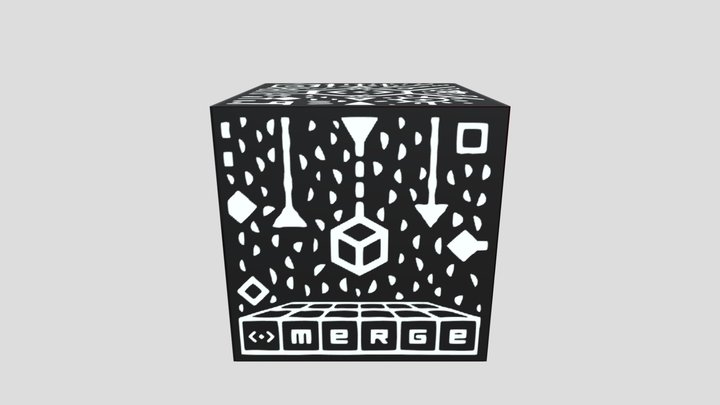
Mergecube

19 Downloads
1 Likes
3 Makes
Go to Model
SummaryThis is a remix of this model on Thingiverse https://www.thingiverse.com/thing:4436613 I found out about these mergecubes recently. There were a few 3d models but none exactly like I wanted so I modified one for my own. I recessed the white parts of the pattern into the cube instead of having them sticking out and combined it all into one piece.The cube is 74mm^2. The solid version took ~12 hours to print at 0.2mm layer height and 20% infill. I printed it in transparent PLA because that was the closest thing I had to white. I saw a reddit post that printed the cube and coloured in the sides with black marker, so I tried that quickly on one side to teset it. Even though the print absorbed a lot of the ink and it endedd up grey, it surprisingly worked really well.I made two versions, one solid cube and one with indiviual faces to be stuck together. I modified the brace of the original to be used to stick the individual faces together.The creator of the original version also includ
Category
Other Toys & Games
Source
MakerWorld
Published
Updated
What you need to print this: Beginner Medium confidence
Why?
print-in-place design · 0.20mm layers
Print-in-place
Supports 1/3
Assembly 0/3
Settings 1/3
Bed size 0/3
Post-process 0/3
Printer
FDM / FFF
File format
STL
Material
PLA, ABS
Layer height
0.2 mm
Est. print time
12 h
Software
Cura, PrusaSlicer, or similar
Same designer, more platforms

rhynes also publishes on

74 additional models across 1 more platforms

Verified by matching model titles across platforms.
Frequently Asked Questions
Does Mergecube need supports when printing?
Nope — Mergecube is print-in-place, so it comes off the bed ready to use. No supports, no assembly.
How long does it take to print Mergecube?
According to the design notes, Mergecube takes approximately 12 hours to print at standard settings (0.2 mm layer height, 15% infill). Actual print time varies based on your printer speed, layer height, and infill density.
What file format is Mergecube available in?
Mergecube is available in STL format. These files can be opened and sliced using free software such as Cura, PrusaSlicer, Bambu Studio, or OrcaSlicer for FDM printing, or ChiTuBox and Lychee Slicer for resin printing. The download is provided through MakerWorld.
Is Mergecube free to download?
Yes, Mergecube is available as a free download through MakerWorld. Always check the license on the original platform to understand commercial use, remixing, and attribution requirements.
No ratings yet
No comments yet – be the first!

Similar Models

6 Suggestions
Feed Blog Slicer Cost Calculator Image Search Submit Kontakt Discord ☕ Buy me a coffee
DE EN FR ES IT NL

Add to Collection