 Thingiverse


Raspberry Pi Camera V2 Mount for Ender 3 v2
par crsn00
2.9k
Téléchargements
1.8k
Likes
24
Makes
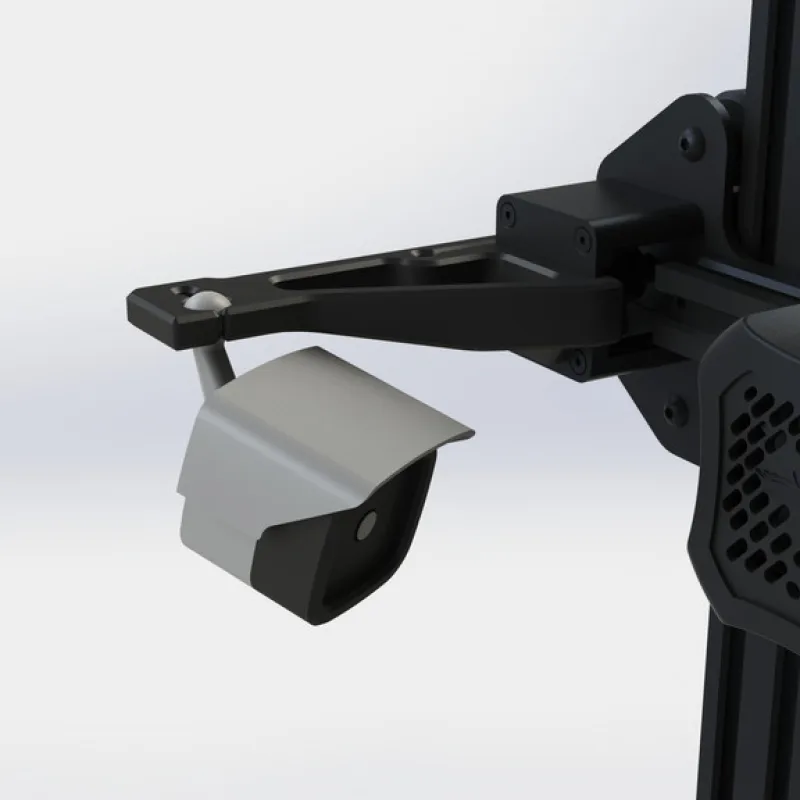
Raspberry Pi Camera v2 case with a mounting arm for an Ender 3 V2 (also probably Ender 3) modeled as a mini security camera.
-- Arm piece is not compatible with BLTouch. See remixed arm for a compatible version --
5 separate parts in total, all are designed to snap together and print with no supports (I used a brim on the housing bracket oriented with the ball facing up). These have been fit tested using PLA only. The PLA ball and socket is pretty slippery and mine would droop with vibration. I would suggest covering either the ball or socket with some clear silicone sealant to increase the friction and prevent this.
Assembly:
1. Install the Raspberry Pi camera onto the mounting plate by pushing the two tabs inward, slightly bowing the part into a U shape. Slide the camera over the pins then release the tabs and the overhang on the pins will grab onto the Pi camera.
2. Install the ribbon cable on the Pi camera (best to do this before it is attached to your Pi, otherwise,
-- Arm piece is not compatible with BLTouch. See remixed arm for a compatible version --
5 separate parts in total, all are designed to snap together and print with no supports (I used a brim on the housing bracket oriented with the ball facing up). These have been fit tested using PLA only. The PLA ball and socket is pretty slippery and mine would droop with vibration. I would suggest covering either the ball or socket with some clear silicone sealant to increase the friction and prevent this.
Assembly:
1. Install the Raspberry Pi camera onto the mounting plate by pushing the two tabs inward, slightly bowing the part into a U shape. Slide the camera over the pins then release the tabs and the overhang on the pins will grab onto the Pi camera.
2. Install the ribbon cable on the Pi camera (best to do this before it is attached to your Pi, otherwise,
Vous avez imprimé ce modèle ? Connectez-vous et partagez votre make !
Connectez-vous pour laisser un commentaire
Se connecterPas encore de commentaires – soyez le premier !


