Slicer Discord
FDM Supportless Majestic Dragon – 3D-Druckmodell von MyMiniFactory MyMiniFactory
Tabletop

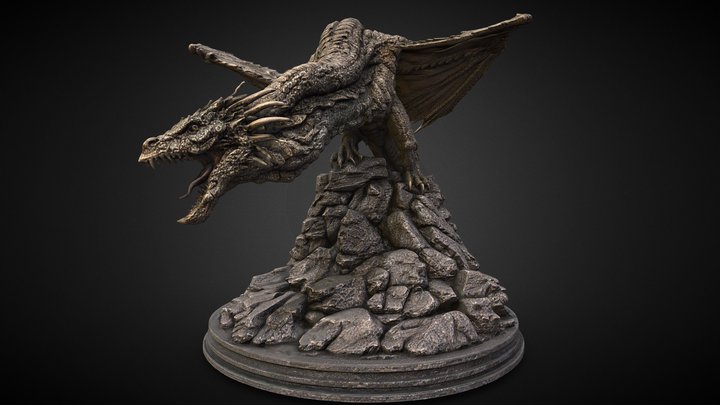
FDM Supportless Majestic Dragon

0 Downloads
4 Likes
0 Makes
Zum Modell
I'm super happy to share the first FDM 100% supportless figure that I've ever designed! It took a lot of trial and error, but here it is, finished and printable in one piece, with a filament printer, and absolutely no supports needed! It should even be possible with 0.2 layers on a 0.4 nozzle, since there are no tiny details that you need to print on top of. Printing supportless FDM miniatures was what really got me hooked on 3d printing to begin with, so i really hope this can spark some of the same excitement in someone else! Perfect for painting, display pieces, D&D, fantasy RPGs, wargaming, or dioramas. Optimized for FDM printing, but it also prints beautifully in resin if preferred. It scales super well, just adjust the X or Y size in your slicer to match you desired base size. I had good results down to 40mm, and had no issues all the way up to 150mm.
Kategorie
Tabletop
Quelle
MyMiniFactory
Veröffentlicht
Was du zum Drucken brauchst: Anfänger Niedrige Konfidenz
Warum?
Print-in-place-Design · großer Druck
Print-in-place
Supports 1/3
Zusammenbau 0/3
Einstellungen 1/3
Druckbett 2/3
Nachbearbeitung 1/3
Drucker
FDM / FFF
Dateiformat
STL
Material
PLA, ABS
Mindest-Druckbett
200 mm (Groß)
Nachbearbeitung
Bemalen
Software
Cura, PrusaSlicer o. Ä.
Häufig gestellte Fragen
Welcher 3D-Drucker eignet sich für FDM Supportless Majestic Dragon?
Jeder FDM-Drucker sollte mit FDM Supportless Majestic Dragon gut zurechtkommen. Bewährt hat es sich u. a. auf Bambu Lab A1, Prusa MK4, Creality Ender 3, Anycubic Kobra. Ein Mindest-Bauraum von 200 mm wird empfohlen.
Benötigt FDM Supportless Majestic Dragon Stützstrukturen beim Drucken?
Nein – FDM Supportless Majestic Dragon ist Print-in-place, kommt also fertig vom Druckbett. Keine Stützen, kein Zusammenbauen.
In welchem Dateiformat ist FDM Supportless Majestic Dragon verfügbar?
FDM Supportless Majestic Dragon ist im Format STL verfügbar. Diese Dateien können mit kostenloser Software wie Cura, PrusaSlicer, Bambu Studio oder OrcaSlicer für FDM-Druck geöffnet und gesliced werden — oder mit ChiTuBox und Lychee Slicer für Resin-Druck. Der Download wird über MyMiniFactory bereitgestellt.
Ist FDM Supportless Majestic Dragon kostenlos herunterladbar?
Ja, FDM Supportless Majestic Dragon ist als kostenloser Download über MyMiniFactory verfügbar. Prüfe die Lizenz auf der Originalplattform, um kommerzielle Nutzung, Remix und Namensnennung zu verstehen.
Noch keine Bewertungen
Noch keine Kommentare – sei der Erste!

Ähnliche Modelle

6 Vorschläge
Feed Blog Slicer Kostenrechner Bildersuche Einreichen Kontakt Discord ☕ Buy me a coffee
DE EN FR ES IT NL

Zur Sammlung hinzufügen